CBSE Class 10 Information Technology 2018 Question Paper
This question paper contains 28 questions. This question paper includes questions on IT applications in domains such as Business, Education and Governance.
Section A
Attempt any two
1. You cannot park your car anywhere _____ this building for security reasons.
(a) from
(b) around
(c) like
(d) for
2. The teacher has given a new set of instructions _____ the students on school attendance.
(a) from
(b) to
(c) on
(d) around
3. Sandeep is doing his job ____ well.
(a) very (b) vary
(c) much (d) good
4. Alice asked _________ students if they had seen her new orange bag.
(a) some
(b) a little
(c) little
(d) any
Attempt any four
5. To insert a _____ page break, select the row below where you want to insert the page break.
(a) Horizontal
(b) Vertical
(c) Diagonal
(d) Parallel
6. Conditional formatting is available under ____ group in Home tab.
(a) Styles
(b) Number
(c) Editing
(d) Alignment
7. _____ command is used to create a new table in a database.
(a) New
(b) Create
(c) Alter
(d) Select
8. A ____ is an appointment to which you invite people or reserve resources.
(a) Calender
(b) Meeting
(c) Journal Entries
(d) Message
9. When data is transferred on the internet, data is broken up into bits of same sized pieces called _____ .
(a) Header
(b) Packet
(c) Assembler
(d) Bag
10. _____ are the short text messages that can be used for taking quick notes.
(a) Task
(b) Notes
(c) Meeting
(d) Schedule
11. LAN stands for
(a) Local Area Network
(b) Land Area Network
(c) Lease Area Network
(d) Loop Area Network
12. A _____ is the visual motion when one slide changes to the next during a presentation.
(a) Clip Art
(b) Animation
(c) Chart
(d) Slide Transition
Section B
13. Mention four points that should be included in your resume or curriculum vitae.
14. You are planning a day out with your friends. Make a list of at least 4 points which you will take care of to make your trip memorable.
15. You have recently attended a Cyber Safety Workshop in your school. You are excited to share the information with your mother. How would you describe the event ?
16. Write steps to print Handouts/Notes page of a Presentation.
OR
Write steps to create Table in a presentation Software.
17. Illustrate the use of Header and Footer in your document.
OR
List any four types of tab alignment available in a Word Processor.
18. What is DDL ? Mention any two DDL statements.
19. Write SQL query to create the Table Flight with the following structure :
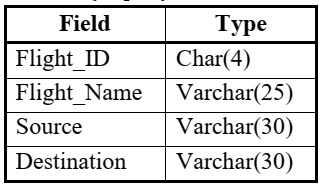
20. Write two features of calender software of an email messaging software.
Section C
21. What is an advantage of using a Document Template ? Write steps to use a document Template.
22. What are Clip Arts ? Differentiate between Linking and Embedding an object.
23. Aadya is working on a spreadsheet. Help her with the solutions for the following :
- Identify the following symbol/toolbar : ∑
- Renaming a worksheet from sheet1 to Cost Sheet.
- To keep the headings constant/visible even if she scrolls down.
24. Ridhan is preparing a Digital Presentation. Help him with the solutions for the following tasks :
- Which option he shall use to make the presentation dynamic and add graphics and text to it ?
- He wants to move all the images/objects together on the same slide.
- Which option he shall use to keep guided text used by presenter ? These notes should not appear to the audience during presentation.
25. Consider the following table and answer the following :
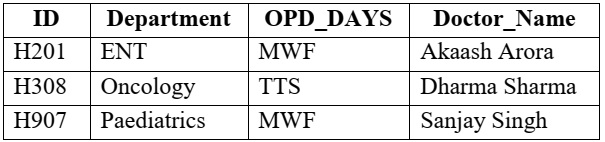
- Identify suitable Primary Key from the above table.
- Add a new record with the following data : (‘H608’, ‘Cardiology’, ‘TTS’, ‘Vinita Wahi’)
- Write a select query to display records of those Doctors whose OPD_DAYS are ‘MWF’.
26. Mention three features of Instant Messaging Service.
Section D
27. Riya uses Internet for her School Project. She is unaware of possible online threats. Mention two online threats and three measures she shall take to ensure safety from online threats.
28. Given the following Spreadsheet, write the appropriate Formula / Expression / Function to be used for (a) to (e) :
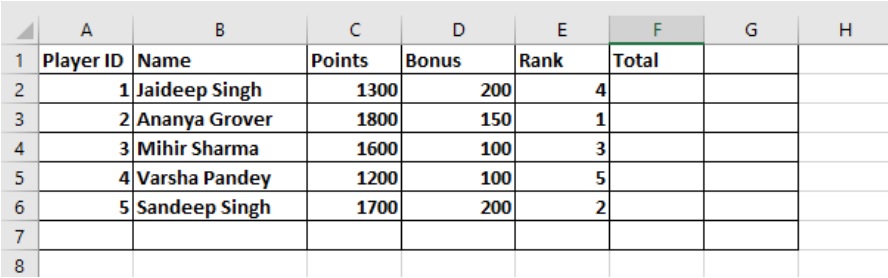
- Write formula to calculate the Total points (Sum of Points + Bonus) of each player in cell F2 - F6.
- Write the feature used for arranging the Rank from Highest to Lowest.
- To find the Player with Maximum TOTAL to be written to Cell F7.
- To find the Average of Points to be written in cell C7.
- To change the Orientation of the Page from Landscape to Portrait.